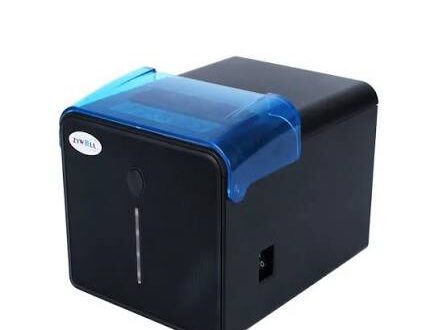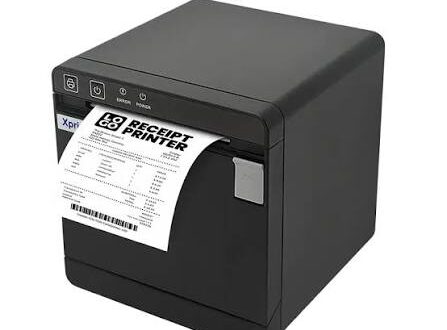

Thermal printing has become an essential technology for businesses that need fast, reliable, and cost-effective printing solutions. From retail stores and restaurants to warehouses and logistics companies, thermal printers are widely used to produce receipts, product labels, shipping documents, and other business records. Their ability to print without traditional ink cartridges makes them a practical choice for many commercial environments.
An Xprinter Thermal Printer is designed to support different printing requirements across various industries, offering solutions for everyday business operations. Understanding how these printers work, their main features, and their practical applications can help businesses determine whether thermal printing is suitable for their needs.
What Is a Thermal Printer?
A thermal printer is a printing device that uses heat to transfer text, images, or other information onto specially designed paper or labels. Unlike conventional inkjet and laser printers, thermal printers generally do not require ink or toner to produce printed output.
This technology is particularly useful for businesses that handle large numbers of transactions or need to print information quickly. Thermal printers are commonly found at checkout counters, shipping departments, ticketing stations, and inventory management facilities.
There are two primary types of thermal printing technology: direct thermal printing and thermal transfer printing. Each method serves different purposes depending on the printing material and durability requirements.
How Does Thermal Printing Technology Work?
Thermal printing works through a heated printhead that creates images or text on a printing surface. The exact process depends on the type of thermal printing technology being used.
Direct Thermal Printing
Direct thermal printers use heat-sensitive paper that changes color when exposed to specific temperatures. The printhead applies controlled heat to selected areas, creating characters, barcodes, and graphics.
This method does not require ribbons, ink, or toner. It is commonly used for receipts, temporary labels, order tickets, and short-term identification tags.
However, direct thermal prints can gradually fade when exposed to excessive heat, sunlight, or friction. Therefore, they may not be suitable for applications that require long-term document preservation.
Thermal Transfer Printing
Thermal transfer printing uses a heated printhead to transfer ink from a ribbon onto paper, synthetic materials, or labels. The ribbon contains a coating that melts under heat and bonds with the printing surface.
This process generally produces more durable prints than direct thermal printing. It is suitable for product identification, warehouse labels, asset tracking, and applications where printed information needs to remain readable for extended periods.
Key Features of Xprinter Thermal Printers
Thermal printers are available in different configurations to accommodate business requirements. Their features can influence printing performance, operational efficiency, and overall usability.
1. Fast Printing Performance
Speed is an important consideration for businesses that process frequent transactions. Thermal printers can produce receipts and labels quickly, helping reduce customer waiting times and improve daily workflow.
Fast printing is especially beneficial in supermarkets, restaurants, retail outlets, and busy service counters.
2. Ink-Free Printing Technology
One of the main advantages of direct thermal printing is that it does not require ink cartridges or toner. This reduces the need for frequent consumable replacements and simplifies routine maintenance.
Thermal transfer models use ribbons, but they still eliminate the need for conventional liquid ink or toner cartridges.
3. Compact and Space-Saving Design
Many thermal printers feature compact designs that fit comfortably on retail counters, office desks, and warehouse workstations.
Their relatively small footprints make them suitable for businesses with limited working space. Portable models can also support mobile operations where printing needs to take place away from a fixed workstation.
4. Clear Text and Barcode Printing
Thermal printing technology can produce sharp text, numbers, and machine-readable barcodes when used with compatible printing materials.
This capability is important for inventory tracking, product identification, shipping operations, and point-of-sale transactions. Accurate barcode printing helps businesses maintain organized product records and reduce scanning difficulties.
5. Multiple Connectivity Options
Modern thermal printers may support several connection methods, depending on the model. Common interfaces include USB, Ethernet, Bluetooth, and Wi-Fi.
These connectivity options allow businesses to integrate printers with computers, POS terminals, tablets, and other compatible devices.
6. Easy Operation and Maintenance
Thermal printers generally have straightforward operating procedures. Loading paper or labels, connecting the device, and configuring basic printing settings are relatively simple tasks.
Regular cleaning of the printhead and checking the condition of printing materials can help maintain consistent performance.
Common Applications of Xprinter Thermal Printers
Thermal printing technology serves a wide range of commercial and industrial purposes. Its flexibility makes it useful in businesses that require frequent document or label production.
Retail Stores and Supermarkets
Retail businesses commonly use thermal printers to produce transaction receipts, price labels, and product identification tags.
At checkout counters, receipt printers help complete purchases efficiently while providing customers with clear transaction records. Label printers can also support shelf organization and inventory management.
Restaurants and Food Service Businesses
Restaurants use thermal printers to print kitchen orders, customer receipts, delivery tickets, and takeaway labels.
Kitchen staff can receive printed order details directly, reducing communication errors between service employees and food preparation teams. In busy restaurants, this helps maintain an organized ordering process.
Warehousing and Logistics
Warehouses and logistics companies depend on accurate labeling to track products as they move through storage and distribution processes.
Thermal printers can produce shipping labels, barcode stickers, package identification labels, and inventory tags. These printed materials help workers identify shipments and maintain accurate stock records.
Healthcare Facilities
Hospitals, clinics, laboratories, and pharmacies use thermal printing for different identification and documentation tasks.
Common applications include patient identification labels, specimen labels, medication labels, and appointment tickets. Clear printing is important in these environments because incorrect or unreadable information can create operational problems.
Transportation and Ticketing
Thermal printers are also used in transportation systems to produce tickets, boarding documents, parking receipts, and entry passes.
Their fast printing capabilities make them useful at ticket counters and self-service kiosks where large numbers of people may need printed documents within a short period.
Benefits of Using Thermal Printers in Business Operations
Choosing thermal printing technology can provide several practical advantages for businesses with regular printing requirements.
Some of the most important benefits include:
- Lower consumable requirements: Direct thermal printers eliminate the need for ink and toner, helping reduce routine supply expenses.
- Improved operational speed: Fast printing supports high-volume transactions and labeling activities.
- Reduced maintenance needs: Fewer traditional printing components can simplify routine maintenance.
- Consistent print quality: Thermal technology produces clear text and barcodes when compatible materials and settings are used.
- Flexible applications: Different printer models can support receipts, labels, tickets, and other business documents.
- Space efficiency: Compact designs help businesses organize their workstations more effectively.
The actual benefits depend on the printer type, printing volume, operating conditions, and quality of the consumables being used.
How to Choose the Right Thermal Printer
Selecting a suitable thermal printer requires an understanding of the business’s daily printing requirements. Different environments need different combinations of printing speed, resolution, connectivity, and media compatibility.
Identify Your Printing Purpose
Start by determining what the printer will produce. Receipt printing, product labeling, shipping documentation, and barcode generation may require different printer configurations.
A direct thermal model may be appropriate for short-term receipts, while thermal transfer technology can be more suitable for durable labels.
Consider Printing Speed and Resolution
Printing speed is important for businesses handling high transaction volumes. A faster printer can help reduce waiting times and maintain workflow efficiency.
Resolution also matters, particularly when printing small text, detailed graphics, or compact barcodes. Businesses should select a model that meets the clarity requirements of their applications.
Check Connectivity Compatibility
Before purchasing a printer, review its supported interfaces and operating system compatibility. The device should connect properly with existing computers, POS systems, or mobile devices.
Businesses with multiple workstations may benefit from network connectivity, while mobile operations may require wireless communication options.
Evaluate Printing Media
Different thermal printers support different paper widths, label sizes, thicknesses, and material types.
Checking media compatibility before making a decision helps prevent printing problems and ensures that the device can handle the intended workload.
Review Durability and Maintenance Requirements
A printer used throughout the day in a warehouse or retail environment may need a more durable construction than one used occasionally in a small office.
It is also useful to consider printhead maintenance, replacement parts, warranty coverage, and technical support availability.
Maintenance Tips for Better Printing Performance
Proper maintenance helps thermal printers operate consistently and can extend their service life.
Businesses can follow several basic practices:
- Clean the printhead regularly: Remove dust, paper residue, and other contaminants using manufacturer-approved cleaning materials.
- Use compatible paper and labels: Incorrect or low-quality media can affect print clarity and contribute to printhead wear.
- Avoid excessive heat exposure: Keep printers away from environments that may cause overheating.
- Inspect printing components: Check rollers, paper guides, and other accessible components for damage or accumulated debris.
- Update printer drivers: Use compatible drivers and firmware to maintain communication with connected devices.
- Follow manufacturer guidelines: Refer to the product manual for recommended cleaning procedures and operating conditions.
These practices can reduce common printing issues, including faded output, paper feeding problems, and inconsistent barcode quality.
Challenges and Limitations of Thermal Printing
Although thermal printers offer several advantages, businesses should also understand their limitations before investing in this technology.
Direct thermal prints are sensitive to heat, light, and friction, which can reduce their readability over time. This makes them less suitable for documents that require long-term storage.
Thermal transfer printing offers greater durability, but it requires compatible ribbons, adding another consumable to the operating process.
Furthermore, print quality depends on the condition of the printhead, the quality of the printing material, and the printer’s configuration. Businesses should consider these factors when comparing thermal printing with other printing technologies.
Conclusion
Xprinter thermal printers represent a practical category of printing equipment designed for businesses that need efficient receipt, label, ticket, and barcode printing. Their applications extend across retail, hospitality, healthcare, transportation, warehousing, and logistics.
By understanding the differences between direct thermal and thermal transfer printing, evaluating essential features, and following proper maintenance practices, businesses can make more informed equipment decisions. Choosing a printer that matches the intended workload and operating environment can improve printing efficiency, support accurate documentation, and contribute to smoother daily operations.