
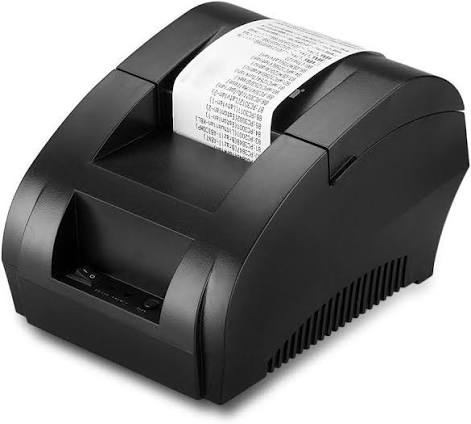
A thermal receipt printer is a printing device that produces text, numbers, barcodes, and other information on specially coated paper using heat instead of traditional ink or toner. These printers are commonly found in retail stores, supermarkets, restaurants, banks, and other businesses where fast and reliable receipt printing is essential. Their simple operation and low maintenance requirements make them a practical choice for everyday transaction processing.
As businesses continue to improve their point-of-sale (POS) systems, understanding how thermal printing technology works has become increasingly important. A Thermal Receipt Printer can help streamline checkout operations by producing clear receipts quickly while reducing the need for consumable printing supplies such as ink cartridges and ribbons. This technology is particularly useful in environments where employees handle a large number of customer transactions throughout the day.
What Is a Thermal Receipt Printer?
A thermal receipt printer is a compact printing machine that uses heat-sensitive paper to create printed information. Unlike inkjet or laser printers, it does not require liquid ink, toner powder, or conventional printing ribbons. Instead, it uses a heated printhead to activate a chemical coating on the surface of thermal paper.
When specific areas of the paper receive heat, they change color, usually turning black. This process creates the characters, symbols, and graphics needed for a receipt. Because the printing mechanism has fewer moving parts and does not rely on traditional ink supplies, thermal printers are generally easy to operate and maintain.
These devices are widely used in businesses that need to print transaction records, payment confirmations, order details, and customer receipts.
How Does a Thermal Receipt Printer Work?
The working principle of a thermal receipt printer is based on controlled heat transfer. Its internal components work together to convert digital information into printed output.
The printing process generally involves several steps.
1. Receiving Digital Information
When a customer completes a purchase, the POS system sends transaction information to the receipt printer. This information may include product names, quantities, prices, taxes, payment details, and the total amount.
The printer receives these instructions through a communication interface, such as USB, Ethernet, Bluetooth, or Wi-Fi, depending on the model.
2. Processing the Print Data
The printer’s internal control board processes the incoming data and converts it into instructions that the printhead can understand.
These instructions determine which heating elements should activate and how much heat should be applied to different areas of the paper. This allows the printer to reproduce letters, numbers, barcodes, and other receipt information accurately.
3. Applying Heat to Thermal Paper
The thermal paper passes between the printhead and a pressure roller. The printhead contains numerous tiny heating elements that activate specific areas of the paper.
When these elements become hot, they trigger a chemical reaction in the paper’s heat-sensitive coating. The affected areas darken, forming the required text and graphics.
4. Feeding and Cutting the Paper
As printing continues, the printer’s feed mechanism moves the paper through the printing area at a controlled speed. Once the receipt is complete, the printer either presents the printed paper for manual tearing or uses an automatic cutter to separate it.
The finished receipt is then ready for the customer.
Main Types of Thermal Receipt Printers
Thermal receipt printers are generally divided into two main categories: direct thermal printers and thermal transfer printers. Although both use heat, their printing methods and applications are different.
Direct Thermal Printers
Direct thermal printers create images by applying heat directly to specially coated thermal paper. They do not require ink, toner, or ribbons.
These printers are especially popular in retail and hospitality environments because they offer fast printing speeds and relatively simple operation.
Common applications include:
- Retail purchase receipts
- Restaurant bills
- Supermarket transaction records
- Parking tickets
- Queue management tickets
- Payment confirmations
One limitation is that direct thermal prints can gradually fade when exposed to excessive heat, sunlight, friction, or certain environmental conditions.
Thermal Transfer Printers
Thermal transfer printers use a heated printhead to transfer ink from a ribbon onto a printing surface. This method can produce more durable images than standard direct thermal printing.
Although thermal transfer technology is commonly used for labels, tags, and product identification, it is less typical for everyday POS receipts because it requires additional consumable materials.
For most routine checkout applications, direct thermal printing is the more common solution.
Key Components of a Thermal Receipt Printer
Understanding the main components helps explain how these devices deliver consistent printing performance.
Thermal Printhead
The printhead is the most important component because it generates the heat needed to produce images on thermal paper. Its heating elements activate in a controlled pattern to create readable characters and graphics.
Printhead quality has a direct influence on printing clarity, consistency, and overall device performance.
Thermal Paper Roll
Thermal paper is specially manufactured with a heat-sensitive coating. When exposed to the printhead’s heat, this coating changes color to form the printed content.
Paper quality matters because unsuitable or low-quality rolls can affect print clarity and may contribute to unnecessary printhead wear.
Platen Roller
The platen roller supports the paper and maintains contact between the paper surface and the thermal printhead. It also helps move the paper through the printing mechanism at a consistent speed.
Control Board
The control board manages communication, data processing, and printing operations. It interprets incoming instructions and coordinates the printer’s internal components.
Paper Cutter
Many modern receipt printers include an automatic cutter that separates receipts after printing. This feature is particularly useful in busy businesses where employees need to process transactions quickly.
Benefits of Using Thermal Receipt Printers
Thermal receipt printers offer several practical advantages for businesses that handle frequent transactions.
Fast Printing Performance
Thermal printers can produce receipts within seconds, making them suitable for environments with continuous customer activity. Fast output helps reduce waiting times at checkout counters and improves transaction flow.
Lower Maintenance Requirements
Since direct thermal printers do not use ink cartridges or ribbons, businesses have fewer consumable supplies to manage. Their relatively simple printing mechanisms can also reduce routine maintenance requirements.
Quiet Operation
Thermal printing generally produces less noise than many traditional printing technologies. This makes it appropriate for restaurants, retail counters, reception desks, and other customer-facing environments.
Compact Design
Many receipt printers feature space-saving designs that fit comfortably on checkout counters and workstations. Their compact construction is especially useful for small businesses with limited counter space.
Reliable Daily Operation
Thermal printers are designed to handle repeated printing tasks. When paired with suitable paper and properly maintained components, they can provide consistent output throughout regular business operations.
Common Applications of Thermal Receipt Printers
Thermal receipt printers support a wide range of commercial activities. Their speed and convenience make them useful across different industries.
Retail Stores: Retail businesses use these printers to generate purchase receipts, return records, and transaction summaries. Clear printed information helps customers verify their purchases.
Restaurants and Cafes: Food service businesses use thermal printers for customer bills, kitchen orders, and takeaway receipts. Their quick printing capabilities help staff manage orders efficiently.
Supermarkets: Supermarkets often process hundreds or thousands of transactions daily. Thermal printers provide fast receipt production at checkout stations.
Banking and Financial Services: Banks and financial institutions use thermal printing technology for transaction slips, payment confirmations, and queue tickets.
Transportation and Parking: Bus terminals, parking facilities, and ticketing counters use thermal printers to produce payment records and other short documents.
Healthcare Facilities: Clinics and pharmacies may use these devices to print payment receipts, appointment slips, and transaction records.
Thermal Receipt Printers vs. Traditional Printers
Thermal receipt printers differ from traditional inkjet and laser printers in several important ways.
| Feature | Thermal Receipt Printer | Inkjet Printer | Laser Printer |
|---|---|---|---|
| Printing method | Heat-sensitive paper or thermal transfer | Liquid ink | Toner and laser technology |
| Ink requirements | None for direct thermal | Ink cartridges | Toner cartridges |
| Printing speed | Generally fast for receipts | Varies by model | Generally fast |
| Maintenance | Relatively low | Requires ink management | Requires toner and component maintenance |
| Noise level | Generally quiet | Varies | Varies |
| Typical applications | Receipts and tickets | Documents and images | Office documents |
Thermal receipt printers are particularly suitable for short transaction records, while inkjet and laser printers are better suited to general-purpose document printing.
Choosing between these technologies depends on the type of documents a business needs to produce, its printing volume, and its operating requirements.
Factors to Consider When Choosing a Thermal Receipt Printer
Selecting an appropriate receipt printer involves evaluating several technical and operational factors.
Printing Speed
Printing speed is important for businesses with high transaction volumes. A faster printer can help reduce checkout delays, especially during busy shopping periods.
Printing Resolution
Resolution affects the clarity of text, symbols, and barcodes. Businesses should consider a printer that delivers sufficiently sharp output for their receipt format and scanning requirements.
Connectivity Options
Different businesses have different POS configurations. USB, Ethernet, Bluetooth, and Wi-Fi connectivity can provide flexibility depending on the installation environment.
Paper Width
Common receipt printer paper widths include 58 mm and 80 mm. Smaller rolls are suitable for compact receipts, while wider rolls provide more room for product descriptions, transaction details, and business information.
Compatibility
The printer should work with the existing POS software, operating system, and hardware. Checking supported printer commands and available drivers before purchasing can help prevent compatibility problems.
Durability and Maintenance
Businesses with frequent printing requirements should consider the printer’s expected workload, printhead durability, cutter performance, and ease of maintenance.
How to Maintain a Thermal Receipt Printer
Proper maintenance helps preserve printing quality and extend the working life of a thermal receipt printer.
The following practices can help keep the device operating efficiently:
- Clean the printhead regularly: Dust, paper residue, and other contaminants can affect print quality. Use an appropriate cleaning method recommended by the manufacturer.
- Use compatible thermal paper: Good-quality paper helps produce clear receipts and reduces the risk of printing problems.
- Keep the printer free from dust: Regularly clean the exterior and paper compartment to prevent debris from entering the printing mechanism.
- Check the paper roller: Inspect the platen roller for dirt, wear, or damage that could affect paper feeding.
- Avoid excessive heat: Keep the printer away from heat sources and direct sunlight to protect its internal components.
- Update drivers and firmware: Where supported, software updates can improve compatibility, stability, and device functionality.
Businesses should also follow the manufacturer’s instructions when replacing paper rolls, cleaning internal components, or addressing mechanical problems.
Common Problems and Their Solutions
Although thermal receipt printers are generally straightforward to operate, users may occasionally experience technical issues.
Faded or Unclear Printing
Faded output may result from poor-quality thermal paper, a dirty printhead, incorrect print settings, or a worn heating element. Checking the paper quality and cleaning the printhead are useful first steps.
Paper Jams
Paper jams can occur when a roll is installed incorrectly or paper becomes trapped in the feeding mechanism. Removing the roll carefully and reinstalling it according to the manufacturer’s instructions can resolve many basic feeding problems.
Printer Not Connecting
Connectivity issues may be caused by loose cables, incorrect network settings, outdated drivers, or incompatible software. Checking the connection and restarting the printer and POS system may help restore communication.
Automatic Cutter Failure
A cutter may stop working because of accumulated paper debris, mechanical wear, or an obstruction. Regular inspection and appropriate cleaning can help prevent these issues.
If a problem continues after basic troubleshooting, professional servicing may be necessary.
Future Developments in Thermal Receipt Printing Technology
Thermal receipt printing continues to evolve as businesses adopt more advanced POS systems and digital transaction technologies.
Several developments are influencing the direction of this industry.
- Wireless connectivity: Improved Bluetooth and Wi-Fi capabilities are making it easier to integrate receipt printers with mobile POS terminals and wireless checkout systems.
- Smart POS integration: Modern printers increasingly support more flexible connections with cloud-based business software and digital transaction platforms.
- Improved printing efficiency: Manufacturers continue to develop printheads and control systems designed to improve printing speed and operational reliability.
- Compact hardware designs: Smaller and lighter printers are supporting mobile retail, delivery services, and temporary sales environments.
- Sustainable printing practices: Businesses are paying greater attention to paper consumption, responsible material sourcing, and recyclable packaging.
These developments are expected to make receipt printing more adaptable to changing business requirements.
Conclusion
Thermal receipt printers play an important role in modern retail, hospitality, banking, and other transaction-based industries. By using heat-sensitive technology instead of conventional ink or toner, they provide a fast, convenient, and relatively low-maintenance method of producing receipts.
Understanding their working principles, components, advantages, and maintenance requirements can help businesses make better purchasing and operational decisions. As POS technology continues to advance, thermal receipt printers will remain a practical solution for organizations that need reliable and efficient transaction printing.