
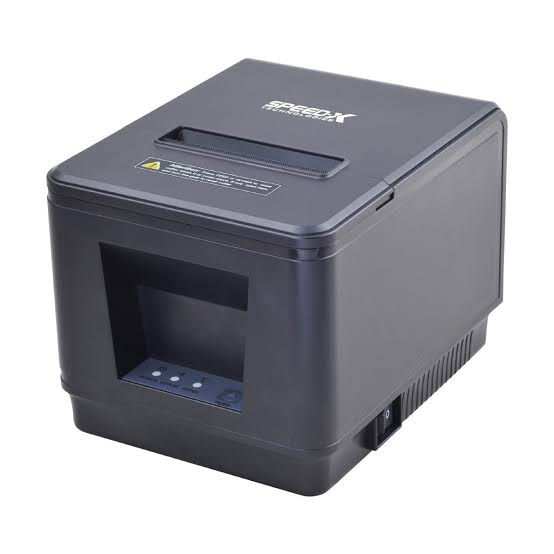
Point-of-sale (POS) systems have become essential tools for businesses that handle customer transactions, manage payments, and monitor sales activities. From retail stores and supermarkets to restaurants, cafes, and hotels, modern POS solutions help businesses process purchases and maintain organized transaction records. Printing remains an important part of these systems because customers and employees often need physical receipts, order tickets, and other transaction-related documents.
Thermal printing technology has become a common choice for POS environments because it offers fast printing, convenient operation, and relatively simple maintenance. By integrating a suitable Thermal Printer with a POS system, businesses can streamline checkout procedures, improve order management, and provide customers with clear transaction information. Understanding the role of thermal printers in modern POS operations helps businesses make better decisions when selecting their printing equipment.
Understanding Point-of-Sale Systems
A point-of-sale system is a combination of hardware and software used to complete customer transactions and manage sales activities. Traditional cash registers mainly handled payment calculations, while modern POS systems offer a wider range of functions.
Depending on the business and software configuration, a POS system may include:
- A computer, tablet, or dedicated POS terminal.
- A barcode scanner.
- A cash drawer.
- A payment terminal.
- A receipt printer.
- Inventory management software.
- Customer and sales databases.
These components work together to process transactions and record relevant information. Thermal printers provide the physical printing function, producing receipts and other documents based on information received from the POS software.
1. Fast Receipt Printing at Checkout Counters
<AsyncImage query=”modern retail point of sale checkout counter thermal receipt printer printing receipt” aspectRatio=”16:9″ width=”100%”/>
One of the primary functions of thermal printers in POS systems is producing customer receipts. After a transaction is completed, the POS software sends the relevant information to the printer, which generates a printed record.
Thermal receipt printers are designed to handle frequent printing tasks. Their ability to produce receipts quickly helps reduce unnecessary delays at checkout counters, particularly during busy shopping periods.
A typical receipt may contain:
- Business name and contact information.
- Transaction date and time.
- Purchased products or services.
- Item quantities and prices.
- Taxes and discounts.
- Payment method.
- Total amount paid.
Fast receipt production supports smoother checkout operations and helps businesses serve customers more efficiently.
2. Improving Transaction Accuracy
Accurate transaction records are important for both customers and businesses. A POS system calculates purchase totals, applies discounts, records taxes, and processes payment information.
When connected to the system, a thermal printer receives the transaction details and reproduces them on the receipt. This reduces the need for employees to write purchase information manually.
Automated receipt printing can help minimize errors involving:
- Product descriptions.
- Item quantities.
- Individual prices.
- Discount calculations.
- Tax information.
- Payment totals.
The accuracy of the printed receipt still depends on the quality of the information stored and processed by the POS software. However, automated printing helps ensure that the same transaction data is consistently presented to the customer.
3. Supporting Inventory Management
Modern POS systems often connect sales activities with inventory databases. When a product is purchased, the system can update its stock information automatically.
Thermal printers support this broader workflow by producing barcode labels and product identification materials used during inventory management.
For example, a retail business can use a thermal label printer to generate barcode stickers for new merchandise. Employees can scan these labels during checkout, allowing the POS software to identify products and retrieve their prices.
Thermal printing can support:
- Product barcode labels.
- Shelf identification labels.
- Price tags.
- Stockroom labels.
- Inventory tracking stickers.
This connection between labeling and POS operations helps businesses maintain more organized product records.
4. Enhancing Restaurant Order Management
<AsyncImage query=”restaurant POS thermal kitchen printer printing food order ticket kitchen counter” aspectRatio=”16:9″ width=”100%”/>
Restaurants use POS systems to record customer orders, process payments, and coordinate food preparation. Thermal printers play an important role in communicating order information to kitchen staff.
When a server enters an order into the POS terminal, the system can send the relevant details to a designated kitchen printer.
Printed kitchen tickets may include:
- Table or order numbers.
- Food and beverage selections.
- Item quantities.
- Special preparation instructions.
- Customer modifications.
- Order type, such as dine-in or takeaway.
Some restaurant systems support multiple printers assigned to different preparation areas. For example, beverage orders may be directed to a bar printer while food orders are sent to the kitchen.
This arrangement helps organize incoming orders and reduces reliance on handwritten notes or verbal communication.
5. Supporting Different Retail and Hospitality Environments
Thermal printers are used in many businesses because POS operations involve different printing requirements.
Supermarkets and Grocery Stores
Supermarkets use thermal receipt printers at checkout counters and may use thermal label printers for product identification, pricing, and inventory management.
Clothing and Fashion Retailers
Fashion stores can produce purchase receipts, barcode labels, price tags, and product identification stickers.
Restaurants and Cafes
Food service businesses use receipt printers for customer billing and kitchen printers for order preparation.
Hotels
Hotels may use thermal printers for guest billing, restaurant transactions, service receipts, and queue management.
Convenience Stores
Convenience stores rely on fast transaction printing to support frequent customer purchases and routine checkout operations.
Selecting the right printer for each environment helps businesses meet their specific printing requirements.
6. Reducing Printing Supply Management
Direct thermal receipt printers use heat-sensitive paper instead of conventional ink cartridges or toner. This simplifies the supplies required for everyday receipt printing.
Businesses mainly need to monitor paper roll availability and ensure that the correct media is installed.
Potential operational advantages include:
- No conventional ink cartridge replacement.
- No toner purchasing for direct thermal printing.
- Fewer printing consumables to manage.
- Convenient paper roll replacement.
- Simplified routine supply planning.
However, thermal paper remains a recurring expense, and its quality can affect printing performance. Businesses should select compatible paper and consider the total cost of consumables when evaluating equipment.
7. Compact Designs for Checkout Workspaces
<AsyncImage query=”compact desktop thermal POS receipt printer beside touchscreen cash register” aspectRatio=”16:9″ width=”100%”/>
Checkout counters often contain several devices, including payment terminals, barcode scanners, cash drawers, and computer screens. Large printing equipment can make these workspaces difficult to organize.
Many thermal receipt printers feature compact designs that fit comfortably beside POS terminals.
This can help businesses:
- Maintain organized checkout counters.
- Use limited workspace efficiently.
- Keep printing equipment accessible.
- Simplify device placement.
- Create more convenient cashier workstations.
For businesses with limited counter space, compact printer dimensions can be an important purchasing consideration.
8. Supporting Multiple Connectivity Options
Modern POS environments may use desktop computers, dedicated terminals, tablets, or mobile devices. Thermal printers are available with different connectivity options to support these setups.
Common interfaces include:
USB: Provides a direct connection between a printer and a compatible POS terminal or computer.
Ethernet: Allows supported printers to connect to a local network and receive print jobs from compatible systems.
Bluetooth: Supports wireless connections with compatible mobile POS devices.
Wi-Fi: Enables supported printers to communicate through a wireless network.
The correct option depends on the POS hardware, network setup, software compatibility, and business workflow.
Before purchasing a printer, businesses should confirm that its connection interface and communication protocols are supported by their POS system.
9. Enabling Digital and Paper Receipt Options
Customer expectations around transaction documentation continue to change. Many businesses now offer digital receipts alongside traditional printed copies.
A modern POS system may allow customers to receive receipts through email, text messages, or a digital account, depending on the software and available services.
Thermal printers remain useful for customers who prefer physical records or need printed documentation for returns, reimbursements, and expense tracking.
Offering both options can provide greater flexibility without requiring businesses to abandon conventional receipt printing.
10. Supporting Returns, Exchanges, and Refunds
Returns and exchanges are common parts of retail operations. Businesses need reliable transaction information to verify purchases and process adjustments.
Printed receipts provide customers and employees with details such as purchase dates, product descriptions, and transaction numbers.
When connected to a POS system, thermal receipt printers can produce documentation for:
- Original purchases.
- Refund transactions.
- Product exchanges.
- Store credit records.
- Payment adjustments.
Clear documentation helps employees review transaction information and maintain consistent customer service procedures.
11. Improving Queue and Customer Service Management
Thermal printers can also support customer service activities beyond traditional checkout receipts.
Businesses may use dedicated thermal ticket printers to produce queue numbers, appointment tickets, and service references.
These applications are useful in environments such as:
- Banks and financial service offices.
- Hospitals and clinics.
- Government service centers.
- Busy restaurants.
- Customer support counters.
- Retail service departments.
Printed tickets help organize customer queues and provide visitors with a reference number for their service request.
12. Integration With Cloud-Based POS Systems
Cloud-based POS software allows businesses to access sales and operational information through internet-connected systems. Depending on the platform and printer model, thermal printers can be integrated into these environments through supported network connections or compatible print services.
This setup can help businesses coordinate printing across different checkout stations and locations.
For example, a restaurant with multiple service areas may use network-connected printers to direct orders to specific preparation stations.
Retail businesses may also connect compatible printing equipment to centralized product and inventory databases.
However, cloud compatibility is not automatic for every printer. Businesses should check the POS provider’s supported devices, drivers, communication methods, and integration requirements before purchasing equipment.
13. Maintaining Reliable POS Printing Performance
A POS printer must operate consistently because printing interruptions can slow down checkout and service activities.
Regular maintenance helps keep the equipment in good working condition.
Important maintenance practices include:
- Cleaning the printhead according to manufacturer instructions.
- Removing dust and paper residue.
- Using compatible thermal paper.
- Checking the paper roll installation.
- Inspecting cables and network connections.
- Keeping printer firmware and drivers updated when applicable.
- Replacing worn components when necessary.
Employees should also know how to replace paper rolls and identify common printing problems. Basic maintenance training can help businesses reduce avoidable interruptions.
14. Factors to Consider When Choosing a POS Thermal Printer
Selecting a thermal printer requires an understanding of the business’s transaction volume, workspace, and software environment.
Printing Speed
Choose a model capable of producing receipts quickly enough for the expected checkout workload.
Print Width
Check whether the printer supports the receipt width required by the business and its POS software.
Print Resolution
Consider the clarity needed for text, logos, and barcode information.
Connectivity
Verify compatibility with the existing POS terminal, network, and mobile devices.
Paper Capacity
Select a model with suitable paper roll capacity to avoid frequent replacements during busy periods.
Durability
Consider the expected daily workload and whether the printer is designed for the intended operating environment.
Software Compatibility
Confirm that the printer supports the POS platform, operating system, drivers, and printing commands used by the business.
Operating Costs
Evaluate paper expenses, maintenance requirements, replacement parts, and the overall cost of ownership.
These considerations help businesses choose a printer that fits their operational needs rather than focusing only on the initial purchase price.
15. The Future of Thermal Printing in POS Systems
POS technology continues to develop as businesses adopt mobile payments, cloud-based management, automated checkout, and integrated inventory systems.
Thermal printing remains relevant because physical receipts, product labels, and order tickets are still important in many business environments.
Future developments may focus on:
- Faster and more energy-efficient printing.
- Improved wireless connectivity.
- Better integration with mobile POS platforms.
- More compact printer designs.
- Enhanced printhead durability.
- Flexible support for digital and physical workflows.
As POS systems become more connected, compatibility and integration will remain important factors in selecting printing equipment.
Conclusion
Thermal printers play an essential role in modern point-of-sale systems by producing receipts, product labels, kitchen tickets, and other transaction-related documents. They support faster checkout procedures, improve the consistency of printed records, and help businesses connect physical printing tasks with digital sales and inventory systems.
Their applications extend across retail stores, supermarkets, restaurants, cafes, hotels, and service facilities. With options for different printing speeds, paper widths, connectivity methods, and operating environments, thermal printers can support a wide range of POS requirements.
By evaluating printing volume, software compatibility, connectivity, maintenance needs, and operating costs, businesses can select suitable equipment and build a more efficient point-of-sale workflow.